8. 3D Diagnostics
Computer Hardware Requirements and 3D Performance
For visualization of 3D charts we use a software component which requires a DirectX 9c capable (DirectX 11 preferred) Video Card (GPU) with at least 256MB of Video RAM. Less Video RAM than this can cause problems and automatic downgrade to software rendering which is much slower.
Recommended computer hardware is: modern Intel® Core i7 processor, 24 GB RAM, nVidia 1080 GTX video card or better, compatible with DirectX 11, display 1920x1200 or more. Please check Termica Neo Technical Data Sheet for more details.
If your computer doesn't comply with these requirements, then we recommend you to check some entry-level gaming PCs which usually have all these hardware components
Testing 3D Properties of your Computer
In the panel 3D Diagnostics of File menu you can check the 3D properties of graphic card used on your computer.
Please select File in the main menu top left and then select 3D Diagnostics.
To test your graphic card performance used in Termica Neo click on Get Hardware 3D Properties button. The diagnostic results will be listed below button:
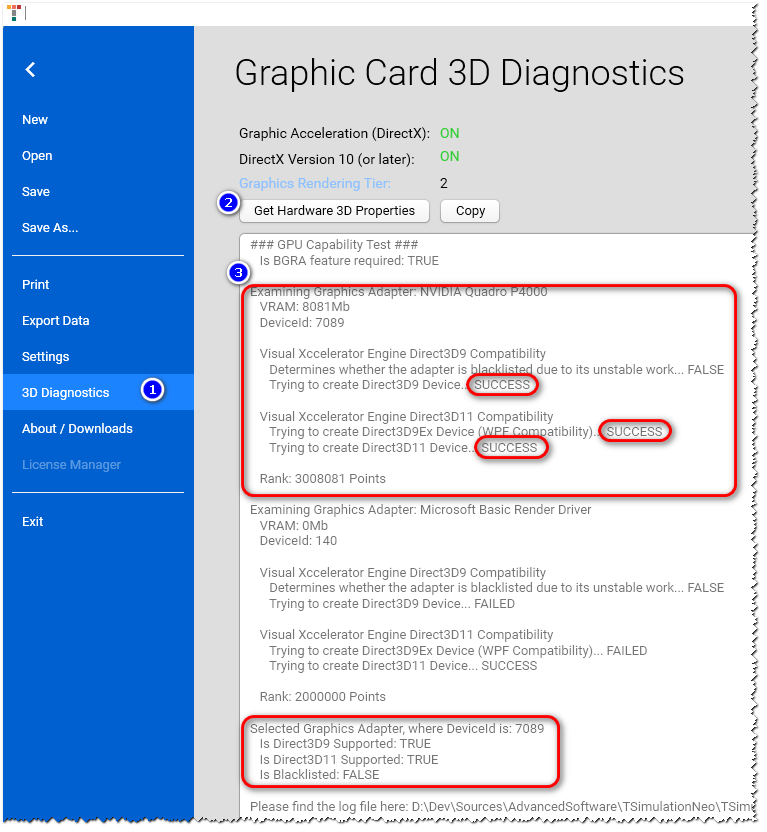
8.1 Graphic Rendering Tier
The possibility of your computer to process 3D graphics fast is very important for Termica Neo software. One of the hardware benchmarks is the Graphic Rendering Tier which characterize the 3D processing hardware (GPU) of your computer.
More information can be found here:
Short citation from the web page above:
The features of the graphics hardware determine the rendering capability of a WPF application. The WPF system defines three rendering tiers:
-
Rendering Tier 0 No graphics hardware acceleration. All graphics features use software acceleration. The DirectX version level is less than version 9.0.
-
Rendering Tier 1 Some graphics features use graphics hardware acceleration. The DirectX version level is greater than or equal to version 9.0.
-
Rendering Tier 2 Most graphics features use graphics hardware acceleration. The DirectX version level is greater than or equal to version 9.0.
The RenderCapability.Tier property allows you to retrieve the rendering tier at application run time. You use the rendering tier to determine whether the device supports certain hardware-accelerated graphics features.
If the Graphic Rendering Tier of your computer is less than 2, then the processing of 3D graphics can be very slow. In this case we recommend upgrading your computer.
8.2 Hardware 3D Properties
Pressing on the button “Get Hardware 3D Properties” will generate diagnostics report about graphic card in your computer, including support of Microsoft Direct3D. These technologies are used for fast rendering and rotating the 3D and Section charts in Termica Neo.
After generating of the report, it is possible to copy the results into the Windows clipboard by pressing on the button “Copy”.